> For clean Markdown of any page, append .md to the page URL.
> For a complete documentation index, see https://nvidia-nvcf.docs.buildwithfern.com/nvcf/llms.txt.
> For full documentation content, see https://nvidia-nvcf.docs.buildwithfern.com/nvcf/llms-full.txt.
# Deployment
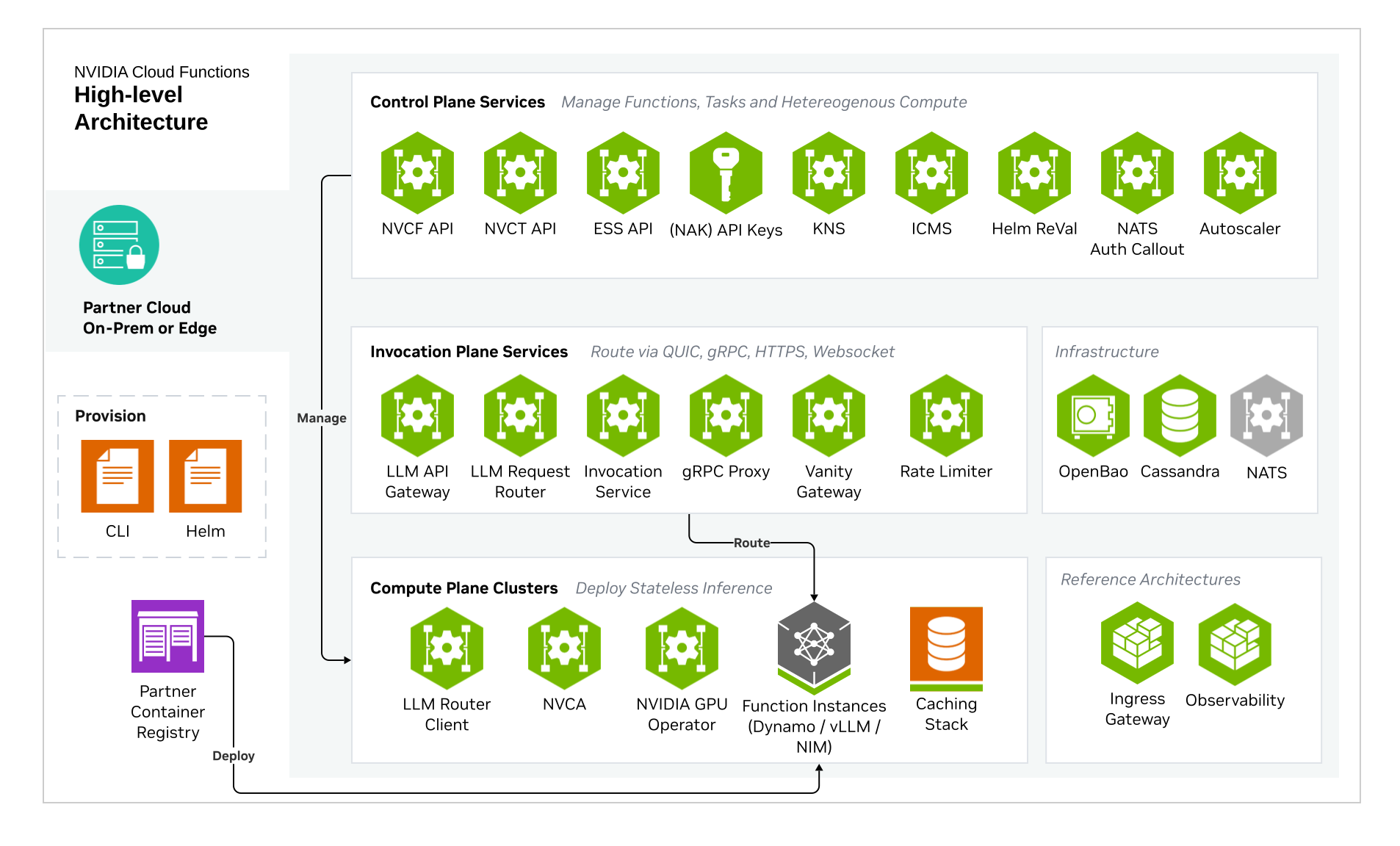
Self-hosted NVCF installation includes the core components required for NVCF inference. Additional optional components such as caching and low latency streaming support are also available.
For a fresh install, start with the [Quickstart](/nvcf/quickstart). The quickstart uses `nvcf-cli self-hosted up` to install the control plane, register a GPU cluster, install NVCA, and run basic health checks.
For a full list of required artifacts, see [self-hosted-artifact-manifest](/nvcf/manifest).
Want to try NVCF locally first? See [Local Development](/nvcf/local-development) to create a k3d cluster, then use the [Quickstart](/nvcf/quickstart) local k3d flow.
## Choose an installation path
| Path | Use when | Starting point |
| --- | --- | --- |
| One-click CLI installation | You want the fastest fresh install and cluster registration path. | [Quickstart](/nvcf/quickstart) |
| Helmfile installation | You need manual release control, partial recovery, upgrades, or detailed Helmfile operations. | [Helmfile Installation](/nvcf/helmfile-installation) |
| Standalone chart installation | You need GitOps integration or chart-by-chart ownership. | [Standalone Deployment](./standalone-deployment.md) |
The control plane and GPU cluster can be the same Kubernetes cluster or separate clusters. The one-click CLI flow supports both layouts.
For remote one-click installs, prepare the Gateway API ingress path and CLI
endpoint configuration before running `nvcf-cli self-hosted up`. See
[Quickstart](/nvcf/quickstart) and [Gateway Routing](/nvcf/gateway-routing).
## Overview
Installation steps are as follows:
1. Mirror NVCF artifacts to your registry. Follow the [image mirroring instructions](/nvcf/image-mirroring) to pull artifacts from NGC and push them to your registry.
2. Create or select Kubernetes cluster targets. You need a cluster for the control plane and a GPU cluster for function workloads. These can be the same cluster or separate clusters.
3. Install the self-hosted control plane. Use the [Quickstart](/nvcf/quickstart) for a one-click fresh install, [Helmfile Installation](/nvcf/helmfile-installation) for manual Helmfile operations, or [Standalone Deployment](./standalone-deployment.md) for chart-by-chart installation.
4. Register a GPU cluster and install the NVIDIA Cluster Agent. The quickstart performs this step. For manual installation paths, see [Self-Managed Clusters](/nvcf/self-managed-clusters).
5. Install Low Latency Streaming if needed for streaming workloads. See [LLS Installation](/nvcf/lls-installation).
6. Install optional GPU cluster enhancements, such as caches. See [Optional Enhancements](/nvcf/optional-enhancements).
## Kubernetes Cluster Requirements
### Cluster Version
- Any official supported Kubernetes version
- Support for dynamic persistent volume provisioning
### Required Operators and Components
**NVIDIA GPU Operator**
Required for GPU workload scheduling. The GPU Operator automates the management of all NVIDIA software components needed to provision GPUs in Kubernetes, including:
- NVIDIA device drivers
- Kubernetes device plugin for GPU discovery
- GPU feature discovery for node labeling
- Container runtime integration (containerd, CRI-O, or Docker)
- Monitoring and telemetry tools
See [NVIDIA GPU Operator documentation](https://docs.nvidia.com/datacenter/cloud-native/gpu-operator/latest/) for installation instructions.
**Fake GPU Operator for Development/Testing:**
For environments without actual GPU hardware, install the fake GPU operator to simulate
GPU resources. See [fake-gpu-operator](/nvcf/fake-gpu-operator) for full instructions.
**Network Policies**
Your cluster must support Kubernetes Network Policies if network isolation is required.
**Persistent Storage**
A StorageClass must be configured for persistent volumes. Common options:
- Amazon EKS: `gp3` (default)
- Local development: `local-path`
- Other platforms: Any CSI-compatible storage class
Some cloud providers have minimum PVC size requirements. For example, AWS EBS gp3 volumes have a 1Gi minimum.
### Cluster Sizing and Storage
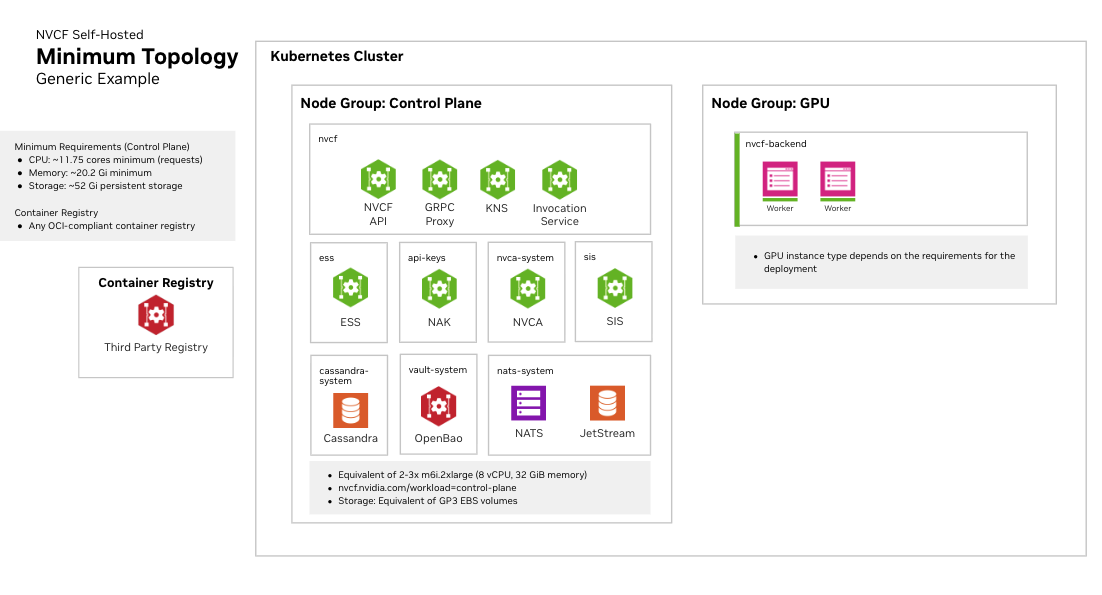
See [infrastructure-sizing](/nvcf/infrastructure-sizing) for node pool specifications, storage
recommendations, and three recommended sizing tiers (Development, Minimal HA,
and Production).