Deployment
Self-hosted NVCF installation includes the core components required for NVCF inference. Optional components such as caching and low latency streaming support are also available. Vanity Gateway routing is available only in stack packages that include the Vanity Gateway addon.
For a local k3d fresh install, start with the Quickstart. The quickstart uses nvcf-cli self-hosted up to install the control plane, register the local k3d cluster, install NVCA, and run basic health checks.
For a full list of required artifacts, see self-hosted-artifact-manifest.

Want to try NVCF locally first? See Local Development to create a k3d cluster, then use the Quickstart local k3d flow.
Choose an installation path
The control plane and GPU cluster can be the same Kubernetes cluster or separate clusters when you use Helmfile or the explicit CLI install primitives. The quickstart supports only a single local k3d cluster. For a complete Amazon EKS example of both topologies, see the CSP End-to-End Example.
For remote installs, prepare the Gateway API ingress path and CLI endpoint configuration before registering GPU clusters or running post-install CLI checks. See Helmfile Installation, Self-Managed Clusters, and Gateway Routing.
Overview
Every installation path follows the same high-level sequence:
-
Clone the NVCF source repository and run repository-based commands from its root directory.
-
Make NVCF artifacts available to your Kubernetes clusters. Pull them directly from NGC when the clusters have NGC access, or follow the image mirroring instructions to copy them to a registry that the clusters can access.
-
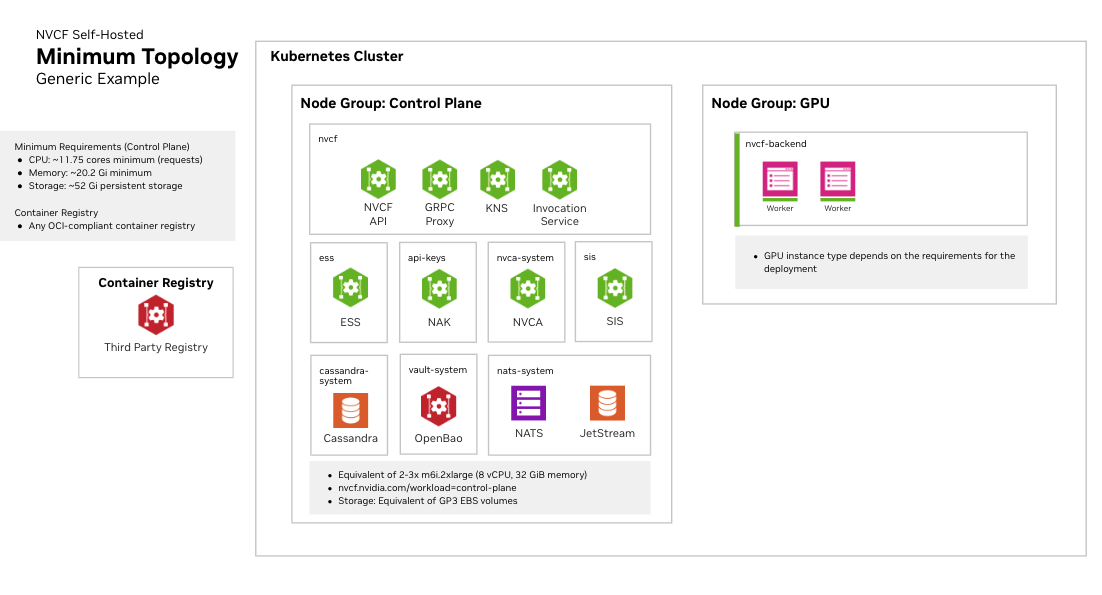
Create or select Kubernetes cluster targets. You need a cluster for the control plane and a GPU cluster for function workloads. These can be the same cluster or separate clusters.
-
Install the self-hosted control plane. Use the Quickstart for a local k3d install or Helmfile Installation for manual Helmfile operations.
-
Register a GPU cluster and install the NVIDIA Cluster Agent. The local quickstart performs this step for the local k3d cluster. For manual installation paths, see Self-Managed Clusters.
-
Install Low Latency Streaming if needed for streaming workloads. See LLS Installation.
-
Install optional enhancements, such as caches, low latency streaming, or Vanity Gateway routing when your stack package includes that addon. See Optional Enhancements.
Kubernetes Cluster Requirements
Cluster Version
- Supported versions are the latest Kubernetes minor release and the two prior minor releases (N-2). See official Kubernetes docs for current supported versions.
- Support for dynamic persistent volume provisioning
Required Operators and Components
NVIDIA GPU Operator
Required for GPU workload scheduling. The GPU Operator automates the management of all NVIDIA software components needed to provision GPUs in Kubernetes, including:
- NVIDIA device drivers
- Kubernetes device plugin for GPU discovery
- GPU feature discovery for node labeling
- Container runtime integration (containerd, CRI-O, or Docker)
- Monitoring and telemetry tools
See NVIDIA GPU Operator documentation for installation instructions.
Fake GPU Operator for development and testing:
For environments without actual GPU hardware, install the fake GPU operator to simulate GPU resources. See fake-gpu-operator for full instructions.
SMB CSI Driver
The SMB CSI driver
(smb.csi.k8s.io) must be installed on every GPU cluster. NVCA uses the
driver for shared model cache storage that function worker pods mount. Install
and verify the driver before registering the GPU cluster. See the
Self-Managed Clusters prerequisites
for the installation command.
Network Policies
Your cluster must support Kubernetes Network Policies if network isolation is required.
Persistent Storage
A StorageClass must be configured for persistent volumes. Common options:
- Amazon EKS:
gp3(default) - Local development:
local-path - Other platforms: Any CSI-compatible storage class
Some cloud providers have minimum PVC size requirements. For example, AWS EBS gp3 volumes have a 1Gi minimum.
Cluster Sizing and Storage
See infrastructure-sizing for node pool specifications, storage recommendations, and three recommended sizing tiers (Development, Minimal HA, and Production).